 DispatchDeck
DispatchDeck Fleet Notifications SMS
Operational text messages sent from your employer’s DispatchDeck account to dispatchers, drivers, and crew.
Who This Program Is For
This program sends operational SMS messages to dispatchers, drivers, and crew of trucking companies that use DispatchDeck. Messages relate to daily schedules, pre-trip and DVIR inspections, clock-in / clock-out, maintenance work orders, and compliance deadlines.
This is not a marketing program. Messages are sent only after the employee has consented through their employer. For DispatchDeck’s separate sales and support SMS program (messages from +1 (830) 406-4458), see dispatchdeck.app/sms-program.html.
About the Program
The DispatchDeck Fleet Notifications SMS program is operated by Blue Collar Coding LLC (1109 6th St E, Williston, ND 58801), doing business as DispatchDeck, on behalf of its trucking-company customers. Messages are sent from a pool of dedicated phone numbers in the +1 (701) area code, with overflow / backup delivery on the toll-free number +1 (855) 500-4752. Recipients may receive messages from either source depending on routing and carrier status.
Program Details
- Program Name: DispatchDeck Fleet Notifications
- Brand: DispatchDeck (Blue Collar Coding LLC)
- Message Types: Schedule notifications, pre-trip / DVIR reminders, clock-in / clock-out alerts, maintenance work-order updates, compliance expiration warnings (CDL medical card, registration, insurance, annual inspections)
- Frequency: Recurring; varies by role and dispatch activity. Typically up to 10 messages per workday.
- Replies: Texts you send may be answered automatically by AI. Reply HUMAN for a person.
- Cost: Message and data rates may apply
- Help: Reply HELP for assistance, or email support@dispatchdeck.app
- Opt-Out: Reply STOP at any time to unsubscribe
Sample Messages
How Employees Consent to Receive Messages
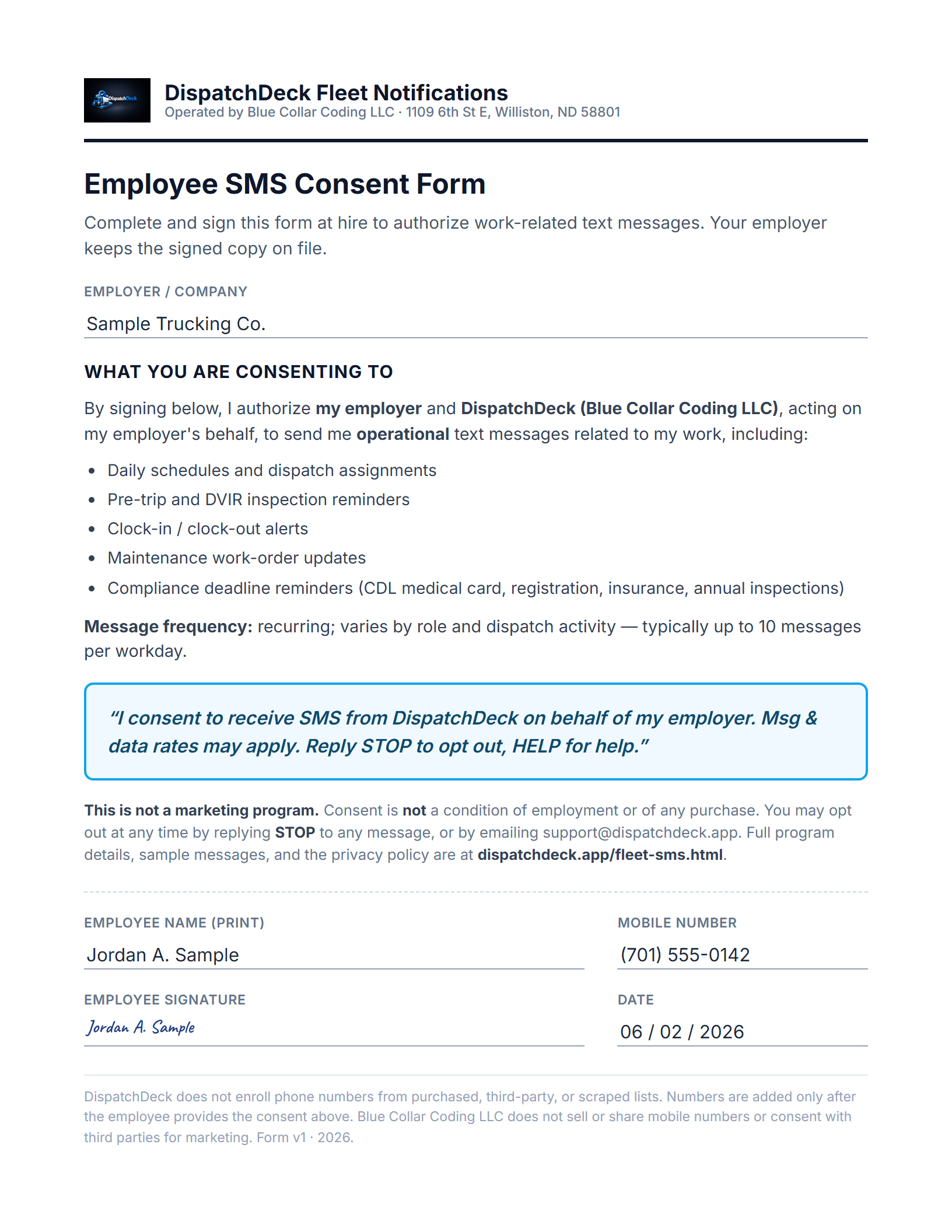
Consent is collected on paper, at hire, before any phone number is added to the system. DispatchDeck does not gather consent through a website or app sign-up form — the trucking company collects a signed written consent form from each employee as part of standard onboarding, the same way it collects W-4, I-9, and MVR-release paperwork.
Step 1 — Employee signs the written SMS consent form (this is the opt-in)
At hire, the trucking company gives each employee the one-page Employee SMS Consent Form and collects their signature. The form discloses the program in full — the operational message types, the message frequency, “Msg & data rates may apply,” and STOP/HELP opt-out instructions — states that consent is not a condition of employment or of any purchase, and links to this page. This signed form is the employee’s opt-in, and the employer retains it on file. The employer is responsible under the DispatchDeck Fleet SMS Terms for collecting and keeping this signed consent record.
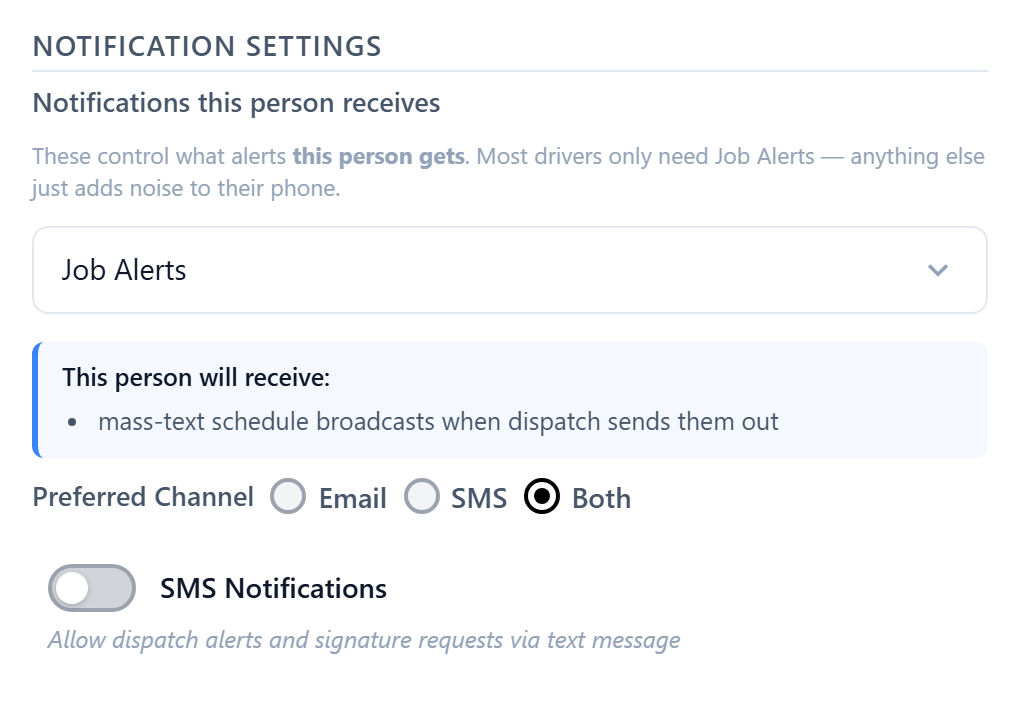
Step 2 — Dispatcher enables messaging after consent is on file
Only after the signed consent form is collected does the dispatcher add the employee in the Roster and turn on the SMS Notifications setting for that record (it defaults OFF for newly added employees). This step is operational enablement inside the software — it is the employer’s control for switching messages on or off, not the consent itself. The opt-in is the signed form in Step 1.
Ongoing — STOP/HELP on every message
Messages include opt-out instructions: “Reply STOP to opt out, HELP for help. Msg & data rates may apply.” Standard STOP/HELP keyword handling is enforced by the carrier and our platform throughout, so an employee can opt out at any time regardless of the consent on file.
DispatchDeck does not enroll phone numbers from purchased lists, third-party lists, scraped data, or any source other than this signed-consent-at-hire process. Consent is not a condition of employment with the employer or of any DispatchDeck product or service.
Are You an Employer Adding Employees to DispatchDeck?
Before adding an employee’s phone number to your DispatchDeck Roster, you must (a) disclose to the employee that they will receive operational SMS messages from DispatchDeck on your behalf, (b) provide the program details on this page or equivalent disclosure, and (c) obtain the employee’s consent to receive those messages. By entering a phone number into DispatchDeck, you confirm that you have collected this consent. See the Fleet SMS Terms for full requirements.
How to Stop Receiving Messages
You can opt out at any time by replying STOP (or STOPALL, UNSUBSCRIBE, CANCEL, END, QUIT) to any DispatchDeck SMS message you receive. You will receive a confirmation message and you will not receive any further messages.
If you cannot reply STOP for any reason, email support@dispatchdeck.app or call (830) 406-4458 with the phone number you want removed and we will opt you out within one business day.
Texts You Send May Be Answered by AI
If your employer has turned on the DispatchDeck texting assistant, texts you send to your company’s DispatchDeck number may be read and answered automatically by an AI assistant, not a person. Their content, along with your name, your role, and earlier texts in the conversation, is processed by our AI provider, Google (Gemini), to understand and answer them. Under our paid service terms with Google, it is not used to train AI models. Your employer’s DispatchDeck admins can see these conversations.
Want a person instead? Reply HUMAN, or just say you want to talk to a person. The assistant stops answering you, your texts are still saved for your employer’s admins, and your regular work texts keep coming. You can also contact your dispatcher directly or email support@dispatchdeck.app.
Your Privacy
Blue Collar Coding LLC does not sell, rent, or share your mobile phone number or SMS opt-in consent with any third parties for their marketing or promotional purposes.
Your phone number is shared only with our SMS service provider (Twilio) for the sole purpose of delivering messages to you, and with your employer (the DispatchDeck customer who added you). If your employer uses the texting assistant, the content of texts you send is processed by our AI provider (Google) solely to read and answer them. Full details are in our Fleet SMS Privacy Policy.
Need Help?
Reply HELP to any DispatchDeck SMS message, email support@dispatchdeck.app, or call (830) 406-4458.